-
Ordering information
Call us or mail us for inquiries & availability: info@mtronixtech.com
-
Search projects by Price
-
Project Categories
- Robots and Robotics
- GSM based Projects
- GPS based Projects
- RFID based Projects
- Energy Saving
- Wireless Communication
- DTMF based proejcts
- SMS based projects
- RF Remote
- Mobile Controlled
- Power Saver
- Sensor based Projects
- Alcohol Sensor
- Heartbit Sensor
- Humidity Sensor
- Infrared Sensor
- Level Sensor
- Light Sensor
- LPG Gas Sensor
- Moisture Sensor
- Temperature Sensor
- Vibration Sensor
- Weight Sensor
-
Search projects by Application
Project Videos:
Landrover Robot Operated by Cellphone
Industrial Automation using Cellphone
Password based door locking
Automatic room light controller
Temperature controlled fan
Electronic voting machine
Search by Components
89c51 89s51 89s52 89v51RD2 555 ADC0808 ADC0809 AT24c16 AT24c64 AT89s52 Battery BC547 Bulb Buzzer Darlington Pair DC motor Decoder EEPROM Fan GPS GSM IR LED Keypad L239D LCD Display LDR LED LM35 LM358 Matrix keypad MAX232 Motor Driver MQ6 PC Interface Relay RFID Card RFID Reader RFID Tags Sim300 sim900 SR86 SR87 Stepper Motor SYHS220 TSOP1738
Home
Projects of 8051 Project Details
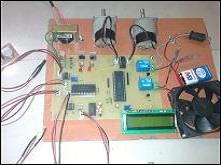
Monitor and Control of Greenhouse Environment
|
Project Cost :  6,100/-
Available in: 3 Days Project Code: 1230 
 |
Project Photographs:


 You will get a CD with this project:
CD contains following things:
1) Project Report
2) Circuit diagram
3) PCB layout
4) Microcontroller program in assembley language
5) Hex file of the microcontroller code
6) Datasheets of all the components / ICs used in the project

Description:
Greenhouse monitoring and controlling project is used to measure the various parameters like
Temperature, Humidity and Light and to display them on a LCD.
Temperature, Humidity and light is sensed by respective sensors.
Sensor output is amplified and given to ADC.
Microcontroller controls these parameters and keeps them at some
predefined levels using relay interface. These relays can be
connected to Fan/Heater. For demo purpose we have connected a 12 volt fan and a bulb.
Values of temperature and light are send to a computer through serial port.
These values can be displayed on PC using hyper terminal.
Block Diagram:

Description:
It mainly consist of following blocks
1. Sensors: we are going to use temperature sensor and light
sensor to sense temperature and light respectively. These sensors sense the
parameters and gives corresponding voltage output
2. Amplifier: As the voltage output from the sensors is in
miliVolts, it has to be increased to 0 to 5 volts range. We are going to use
linear amplifier for this purpose.
3. ADC: The main part of our project is microcontroller
which reads only digital input. (0V & 5V) But the output of Amplifier is
in analog form, so it has to be converted into digital format, for this
purpose we are going to use ADC to convert analog output from amplifier
into the digital output to be given to microcontroller
4. Microcontroller: This is the CPU (central processing unit)
of our project. We are going to use microcontroller of 8051 family.
The various functions of microcontroller are like
I. Reading the digital input from ADC which is derived from Temperature
and Light sensor. II. Sending this data to LCD so that the person
operating this project should read the values of temperature and light.
III. Controlling the parameters like Temperature, light, turning On/Off
the respective relays IV. Sending the values of temperature and light
to the computer using serial port
5. Relay: We have used 2 relays in our project.
First one will be turned on when the temperature falls below the desired value.
And the second relay will be turned on when temperature reaches
above the desired value. (e.g. if the desired value is 20 degree C,
then Relay 1 will be turned on when temperature is 19 or below and
Relay 2 will be turned on when temperature is 21 or above)
6. PC Interfacing: We are going to use max 232 IC
for pc interfacing, the values of temperature and light will be
sent to pc when the key is pressed
Application and Advantage:
1. Can be used in green houses to control the temperature and light for the proper growth of plants
2. With little modification, this project can be used in Mechanical companies to measure various parameters of operating machines like temperature and light.
3. Temperature monitoring and controlling action can be used in home or various halls like conference room, seminar hall to control the temperature of room
Future Development:
1. We can monitor more parameters like Humidity, PH of soil, pressure, water level and at the same time control them
2. We can send this data to a remote location using mobile or internet
3. We can draw graphs of variations in these parameters using computer
Tags: Agricultural project, Energy saving, Energy saver
Question and answers about this project:
Do you have question or any feedback about this project?
Please email your questions to: info @ mtronixtech.com